
Screenshots are not ordinary photos. Small text, one-pixel lines, flat colors, and sharp boundaries make compression artifacts easy to notice. Start with dimensions and format before pushing quality lower.
Crop before you compress
Remove unused browser chrome, blank margins, and unrelated panels in the capture tool that created the screenshot. This product does not include an editor, so cropping must happen before you add the file. Fewer pixels reduce both file size and visual distraction.
Match the intended display width
Documentation rarely needs a full-resolution desktop capture. In the image resizer, set a maximum width that matches the content column or presentation. Keep aspect ratio and “do not enlarge” enabled. Review the output at its actual display size, not only zoomed out.
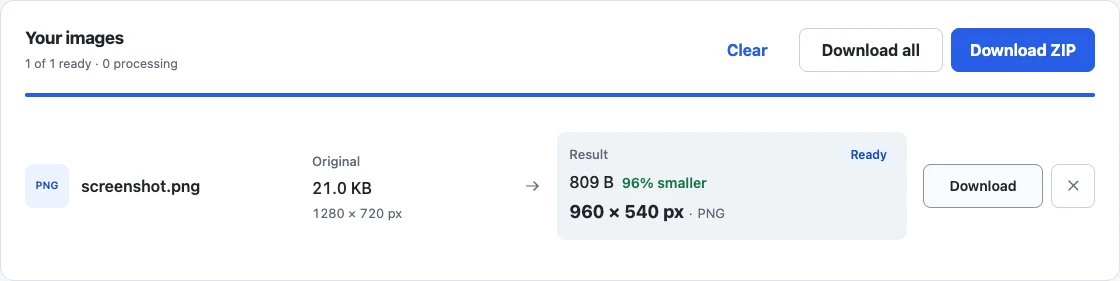
For example, entering 960 in Maximum width (px) and leaving Maximum height (px) blank reduces this generated 1280 × 720 interface sample to 960 × 540. The tool keeps the proportions automatically. In Advanced settings, Quality is set to 100 to avoid PNG color reduction; resizing still changes the pixels, so check small text in your own screenshot before choosing a width.
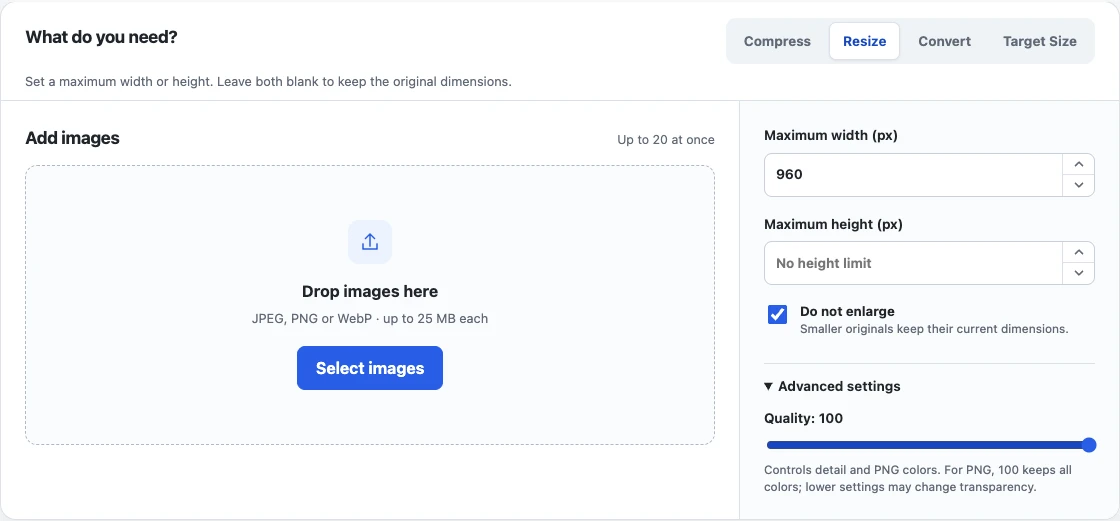
The result lists the new dimensions beside the original. This sample demonstrates the resize workflow; its simple generated shapes do not establish how readable your own text will be.
Choose the format by content
PNG often keeps flat interface regions and text edges clean, but lossless encoding may remain large. WebP can preserve transparency and reduce size for some screenshots, though the destination must support it. JPEG can work for photo-heavy captures but has no alpha and may create halos around text.
Inspect the risky areas
Open the download and check small labels, code, thin dividers, icons, and color gradients. If text looks soft, raise quality or keep PNG and reduce dimensions instead. A strict target can be unreachable without an unacceptable tradeoff; the tool should say so plainly.
Re-encoding can remove or change metadata and color-profile information. Keep the original screenshot as the source of truth. For the underlying tradeoff, read image quality versus resolution. For general encoder behavior, see how image compression works.