
Email limits vary by provider, message, and recipient. A useful workflow therefore starts with the image’s purpose instead of inventing one “correct” attachment size.
Decide how the recipient will use the image
For quick review on a screen, a moderate dimension cap can remove unnecessary pixels. If the recipient must crop, print, or edit the photo, send a higher-resolution copy through an approved channel instead of over-compressing it.
The email image preset uses conservative photo quality while keeping the original format and dimensions. Use Resize if you also need smaller pixel dimensions. Treat this as a starting point, then inspect the final byte size and appearance.
Keep formats compatible
JPEG is a practical choice for opaque photos. PNG remains useful for screenshots and transparency, though it may be larger. WebP can be compact, but confirm that the recipient’s software accepts it. Never flatten transparency into JPEG without an explicit background decision.
Process a batch carefully
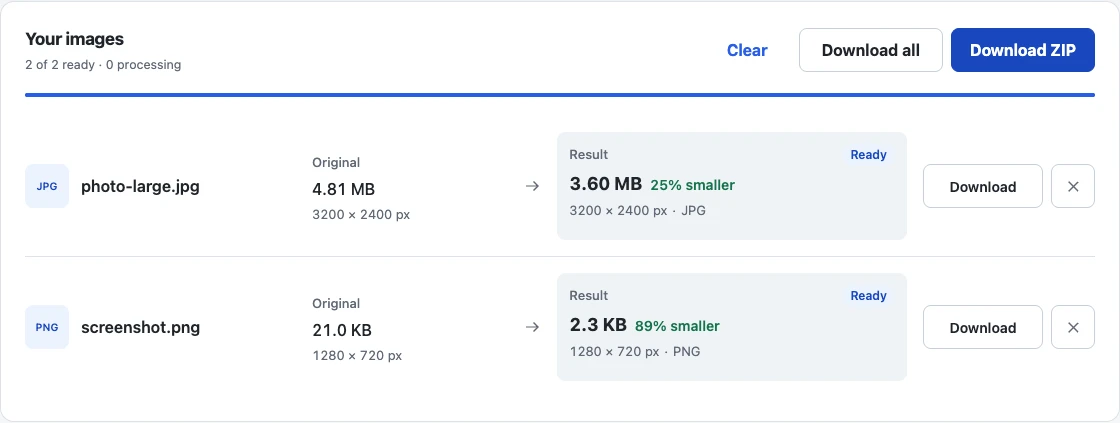
Add the images together, wait for each result, and review failures independently. Download a ZIP when that suits your workflow, but remember that a ZIP does not make already-compressed photos dramatically smaller; it mainly packages them together.
The example below uses two generated sample images to show a mixed JPEG and PNG batch. Compare each result’s size and dimensions before choosing Download ZIP; the combined attachments still need to fit your actual message.
Verify the message before sending
Check the combined attachment size in the actual draft. Open at least one output to confirm dimensions, orientation, and visible quality. Browser re-encoding can remove or change EXIF and color metadata, so keep the source files outside the email workflow.
If a provider gives a specific maximum per image, switch to Target Size and convert the stated byte limit to KB, rounding down to a whole KB (1 KB = 1,000 bytes). The 500 KB guide explains how measured targets work. For screenshots, see reduce screenshot file size.